What Is AWS ECR and How It Works (Beginner Guide)
A plain-English guide to Amazon ECR: what it is, the push and pull flow, IAM auth, lifecycle policies, image scanning, pull-through cache, and cost.
If you have a container image and something on AWS needs to run it, the image has to live somewhere that AWS service can reach. Amazon ECR is that place. It is a private, managed registry for your container images, sitting between the machine that builds the image and the service that runs it.
In the ECS guide I said ECR deserved its own article because the deployment flow does not work without it but it is a distraction inside a piece about orchestration. This is that article. By the end you will understand what a registry is, how the push and pull flow actually works, why authentication is the part that breaks first, and the three features that separate “I pushed an image once” from running ECR properly: lifecycle policies, image scanning, and pull-through cache.
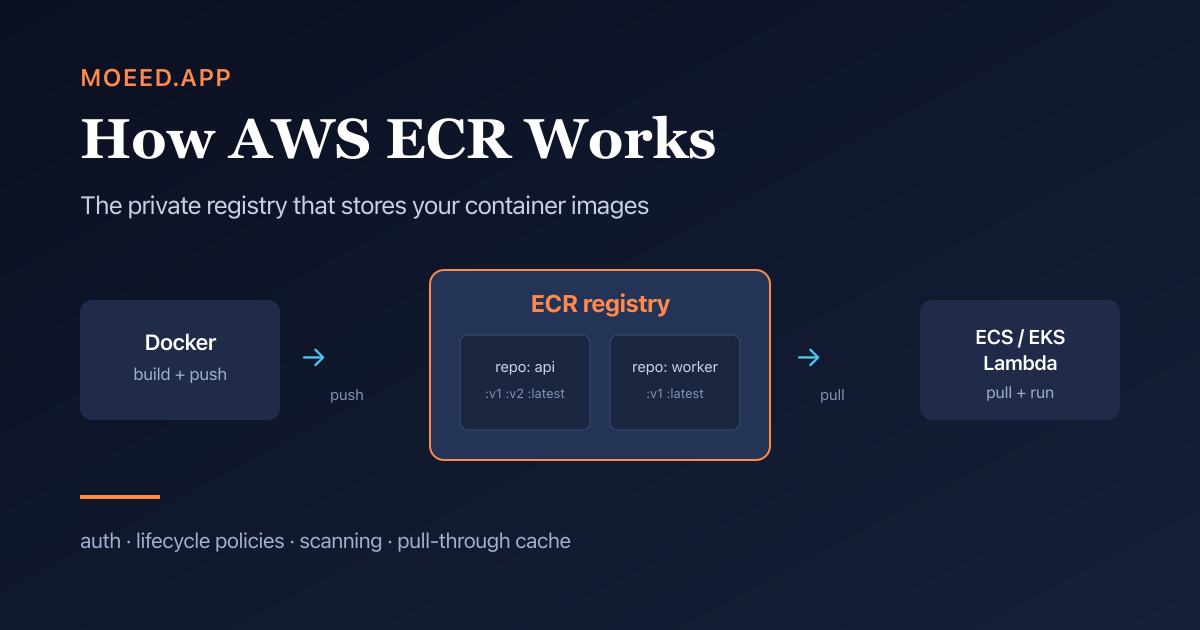
Amazon ECR (Elastic Container Registry) is AWS’s managed registry for container images. You push images into ECR repositories, and AWS services like ECS, EKS, and Lambda pull from there to run them. It uses IAM for access, short-lived tokens for the Docker login, and you pay for storage plus data transfer out, with no separate service fee.
The vocabulary, because this is where beginners trip
Four words get used interchangeably and they should not be. Getting these straight makes everything after it easier.
- An image is the built, sealed package of your application. The thing
docker buildproduces. - A tag is a label on an image, like
:v3or:latest. The same repository can hold many tagged versions of the same app. - A repository holds all the tagged versions of one image. One repo per application is the normal pattern: a
payments-apirepo, aworkerrepo. - A registry is the whole service that holds all your repositories. Your account has one private ECR registry, and many repositories inside it.
A library is the cleanest analogy. The registry is the library building. A repository is one book that has many editions. A tag is the edition number. An image is the specific physical copy you check out. When someone says “push to ECR” they mean “put a new edition of this book into its shelf in the library.”
What Amazon ECR actually is
ECR is a fully managed container registry. “Managed” means you do not run, scale, patch, or back up the registry yourself. You create repositories and push images; AWS handles the storage, availability, and scaling underneath, whether you have one image or ten thousand.
The reason teams on AWS use ECR instead of a public registry like Docker Hub comes down to three things:
- Access is controlled by IAM, the same permission system as the rest of your AWS account, instead of a separate set of registry credentials you have to manage and rotate.
- It is close to where your containers run. When ECS, EKS, or Fargate pull an image from ECR in the same region, the image does not travel over the public internet and you are not billed for that data transfer.
- It integrates with the rest of AWS: image scanning through Amazon Inspector, lifecycle automation, replication across regions, all without bolting on third-party tools.
Private and public ECR are two different things
This catches people, so it is worth being explicit. ECR has two flavors.
Private ECR is the normal one. Your images, your account, IAM-controlled, not visible to anyone you do not grant access. This is what you use for your own applications. Everything else in this article is about private ECR unless stated otherwise.
Public ECR is a separate, public-facing registry (with its own gallery) for images you want the world to pull, like an open-source project distributing its official image. It has different, more generous free transfer limits because the point is public distribution.
If you are deploying your own app, you want private ECR. Reach for public ECR only when you are publishing an image for other people to use.
The core flow: authenticate, push, pull
Here is the whole loop. These commands are stable and worth keeping nearby the first few times.
1. Create a repository. One per application.
aws ecr create-repository --repository-name payments-api2. Authenticate Docker to your registry. This is the step that breaks first, explained in the next section.
aws ecr get-login-password --region us-east-1 \
  | docker login --username AWS --password-stdin \
    <account-id>.dkr.ecr.us-east-1.amazonaws.com
3. Tag your local image with the full ECR path and push it.
docker tag payments-api:latest \
  <account-id>.dkr.ecr.us-east-1.amazonaws.com/payments-api:v1
docker push \
  <account-id>.dkr.ecr.us-east-1.amazonaws.com/payments-api:v1
4. Pull it. Usually you do not do this by hand. ECS, EKS, or Lambda pull the image for you when they start your container, using the image URI you put in their config. The pull is the same operation under the hood; it just happens automatically on the compute that runs your app.
That is the entire flow. Build, authenticate, tag, push, and let the runtime pull. Everything else in ECR is making this flow cheaper, safer, or more automated.
Why authentication works the way it does
The login command above looks strange the first time. Understanding it removes most ECR frustration.
ECR does not have a username and password you set. Instead, aws ecr get-login-password asks AWS for a short-lived token tied to your current AWS identity. That token is valid for about 12 hours, then it expires and you authenticate again. This is deliberate: a leaked token is useless within a day, and access is governed by IAM rather than by a static secret somebody can copy out of a config file.
This is also where first-time ECR use fails, and it mirrors the IAM gotcha from the ECS guide. The identity running the push or pull needs the right IAM permissions:
- To pull, an identity needs the read actions: getting an auth token, checking layer availability, and downloading the image layers. If a fresh ECS task cannot start with an image-pull error, this is almost always a missing pull permission on the task execution role.
- To push, an identity needs the write actions on top of the read ones. This is usually your CI pipeline’s role, not a human.
If you remember one thing: “Docker says denied or no basic auth credentials” means the login token step did not run or expired. “ECS cannot pull the image” means the role doing the pull lacks ECR read permissions. Two different problems, two different fixes.
Lifecycle policies: stop paying for images you forgot
Every push creates a new image. CI pipelines push on every commit. Within a few months a busy repository can hold thousands of old images nobody will ever deploy again, and you are paying to store all of them.
A lifecycle policy is a rule ECR enforces automatically to clean this up. You describe what to keep and ECR expires the rest. Typical rules:
- Keep only the most recent 20 tagged images, expire older ones.
- Expire any untagged image older than 7 days. Untagged images are usually leftovers from a tag being moved to a newer build, so they are safe to remove on a delay.
This is not a nice-to-have. It is the single highest-leverage thing you can set on a repository, because storage cost grows silently and a one-time policy caps it forever. Set it when you create the repo, not after the bill surprises you.
Image scanning: basic vs enhanced
ECR can scan your images for known vulnerabilities. There are two levels and the difference matters.
Basic scanning is free. It runs when you push an image, or on demand, and it checks the operating system packages in the image against a public vulnerability database. It tells you “this base image has a known CVE in this system library.” Good baseline, limited depth.
Enhanced scanning is powered by Amazon Inspector and costs extra. It scans continuously, not just on push, and it covers both OS packages and your application’s language dependencies, the npm and pip and Maven packages your code actually pulls in. Findings flow into AWS security tooling so they can raise alerts. This is what you want for anything handling real user data; basic scanning misses the application-layer vulnerabilities that matter most.
The honest guidance: turn on basic scan-on-push for everything because it is free and zero-effort, and move to enhanced scanning for production images where a vulnerable dependency is a real risk.
Why your storage bill is smaller than you expect
A useful thing to understand about how container images are stored. An image is built from layers, each layer being one step in the Dockerfile. Many of your images share the same base layers, the same node:22-slim foundation, for example.
ECR stores each unique layer once within your private registry and references it from every image that uses it. If fifty of your microservices are built on the same base image, that base is stored a single time, not fifty times. You do not configure this; it is how the storage works. The practical effect is that your real storage cost is usually far lower than image count times image size would suggest, which is worth knowing before you assume ECR will be expensive.
Pull-through cache: the feature that saves you from rate limits
This one needs the concept explained before the feature makes sense, so we will do that first.
When your builds or your cluster pull a popular base image from a public registry like Docker Hub, you are hitting that public registry every time. Public registries rate-limit anonymous pulls. On a busy CI system or a cluster scaling up, you can hit that limit and your builds or deployments start failing with “too many requests,” for a reason that has nothing to do with your code.
A pull-through cache fixes this. You tell ECR “for this upstream registry, be a caching mirror.” The first time anything pulls a given upstream image through ECR, ECR fetches it from the public registry and stores a copy. Every pull after that is served from your own ECR, fast, not rate-limited, and not dependent on the public registry being up. As a bonus, your ECR scanning and lifecycle policies then apply to those third-party images too.
If you have ever had a deploy fail because of a Docker Hub rate limit, this is the feature that makes that failure stop happening. It is one of the most practically valuable things in ECR and most beginners do not know it exists.
What ECR costs
Pricing changes, so treat exact numbers as something to confirm on the current AWS pricing page rather than memorize. The cost model, which is stable, is what to understand:
- You pay for storage, per GB-month of images you keep. This is why lifecycle policies matter; they directly cap this number.
- You pay for data transfer out, for example pulling images across regions or out to the internet. Pulls from ECR to ECS, EKS, or Fargate in the same region are not charged for transfer, which is a strong reason to keep your registry in the same region as your compute.
- There is no separate ECR service fee and no upfront commitment. New accounts get a small free storage allowance to start.
The two practical takeaways: set lifecycle policies so storage does not grow forever, and keep ECR in the same region as the things that pull from it so you are not paying transfer for every deploy.
When you need ECR and when you do not
Use ECR when:
- You run containers on AWS (ECS, EKS, Fargate, or Lambda container images) and want IAM-based access and in-region pulls with no transfer cost.
- You want scanning, lifecycle automation, and replication without assembling third-party tooling.
- You want to stop depending on public registry rate limits, via pull-through cache.
You may not need ECR when:
- You are not on AWS. A registry close to your compute matters; ECR’s advantages are AWS-shaped.
- You are doing a quick local experiment that never leaves your machine. You only need a registry once something else has to pull the image.
- Your organization already standardizes on another registry your AWS compute can authenticate to. ECR is the path of least resistance on AWS, not the only one.
For anything real on AWS, ECR is the default that takes the least effort to get right.
Common questions
Is ECR the same as Docker Hub?
They are both container registries, but Docker Hub is a public, internet-facing service with its own accounts, while ECR is a private registry inside your AWS account governed by IAM and located next to your AWS compute. You can also point ECR’s pull-through cache at Docker Hub so you pull cached copies through ECR instead of hitting Docker Hub directly.
Do I need ECR to use ECS?
In practice, yes, for your own images. ECS runs an image; it does not store it. The image has to live in a registry ECS can pull from, and on AWS that is almost always ECR. See the ECS guide for how the two connect.
Why does my Docker push say “no basic auth credentials”?
Your Docker client is not authenticated to ECR, or the token expired. Re-run the aws ecr get-login-password | docker login command. ECR tokens are short-lived by design, roughly 12 hours, so this is expected, not a bug.
What is the difference between basic and enhanced scanning?
Basic scanning is free and checks operating-system packages on push. Enhanced scanning uses Amazon Inspector, costs extra, runs continuously, and also covers your application’s language dependencies. Use basic everywhere, enhanced for production.
How do I stop ECR storage costs from growing forever?
Attach a lifecycle policy to every repository. A rule like “keep the last 20 tagged images, expire untagged images after 7 days” caps storage automatically. Set it when you create the repo.
Is ECR free?
There is no separate service fee. You pay for stored data and for data transferred out of a region or to the internet. Same-region pulls to AWS compute are not charged for transfer, and new accounts get a small free storage allowance.
Next steps
You now have the registry half of the container deployment story. The other half is the orchestration that pulls from it: the ECS beginner guide walks the full flow from Dockerfile to running container and is the natural companion to this article.
If your container is an MCP server or an agent backend, ECR is exactly where its image lives before ECS or Lambda runs it, and the MCP server security guide covers the auth and audit work to do before exposing it.
Once a new image lands in ECR, the question is which deployment strategy your service should use to pick it up. The deployment strategies guide walks through recreate, rolling, blue-green, canary, and A/B testing in plain English with diagrams, and tells you which one fits an ECS or Kubernetes service.
If a task ever fails to pull from this registry, the fix CannotPullContainerError in ECS guide groups every variant of that error by root cause and gives the exact fix. And if you want the lightest-weight way to actually run the image you pushed, the AWS ECS Express Mode guide is the one-command path that builds the load balancer, scaling, and monitoring for you.
The fastest way to make ECR stick is the same advice as ECS: create one repository, push one trivial image, attach a lifecycle policy, and turn on basic scanning. Do that loop once and every feature above is just the same loop with one more setting turned on.